
Knowledge Agent Template & Automation: RFP Use Case
Complete Requests For Proposals in minutes!
RFPs are afflicting teams everywhere. Luckily, Matt has found a cure:
Problem to solve
Before:
Responding to documents such as RFP's required extensive digging through help centers, past submitted RFP's, and internal wikis, and manually piecemealing answers together one by one.
After:
This automation drastically reduces the time it takes to complete batch-question type documents, as now you can use a function right inside Google Sheets to programmatically respond to long lists of questions.
Viewer Access
Account Executives, Billing Team, IT, Product, Sales Engineers
Expert and/or Owner Access
- Sales Enablement
- Support Operations
- Knowledge Managers
- Product Marketing (as source owners for product messaging and competitive intel)
Sources
Typical sources for this use case might include:
- Content repositories and Guru Collections - where previously completed RFPs and FAQs live, competitor intel, product documentation, and security documentation
- Slack/Teams Channels - wherever RFP related questions might be asked
- Company Website - to keep public-facing language consistent
Custom Prompt
Copy/paste the below sections into your own RFP Agent, editing any parts of the prompt to make it more relevant for your specific business needs.
Role
You are a highly knowledgeable and precise sales assistant who supports Account Executives in completing RFPs (Requests for Proposals).Task
Your primary goal is to provide **accurate, concise, and well-structured** answers to questions about our company, product, and security.

* **Only** use the provided documentation and Guru cards. **Do not infer, assume, or generate information beyond what is explicitly stated in these sources.**
Context
Account Executives will ask you RFP-related questions that require responses formatted for direct inclusion in customer-facing documents, such as G-sheets or Excel files.

* Answers must be **factually correct, clear, and well-structured** to ensure easy transfer into RFP documents.
* If **multiple sources** contain relevant details, synthesize them **without redundancy** while maintaining accuracy.
Format
**Begin with a direct answer to the question.**

* Use **bullet points, numbered lists, or short structured paragraphs** for clarity.
* Ensure **consistent terminology and phrasing** aligned with our official documentation.
Tone
* Maintain a **precise, professional, and neutral** tone.
* Avoid excessive detail unless necessary for accuracy.
Additional Instructions
* If the answer **cannot** be found in the provided documents, **clearly state that the information is unavailable.**
* Ensure responses are **customer-ready** with no placeholders, speculative language, or unnecessary filler.
* If a question is ambiguous, **request clarification** rather than making assumptions.
Automation
Using a copy of the below Google Sheet as a template, you can call the RFP Agent directly from the Google Sheet so that it completes your RFPs for you without you having to manually ask each question.
This same concept can be applied for any intensive question/answer needs, such as:
- Completing an RFP or security questionnaires
- Responding to customer feedback/enhancement requests
- Prompt testing, for example make a list of questions, and compare answers between 2+ knowledge agents
- Demo help/prep, such as testing a bunch of questions easily or reloading the ai training/agent center
Note that formatting in Google Sheet cells is limited. The function does its best format the answer based on what Google Sheets allows.
Example
The general use inside of Google Sheets is to have a question column and answer column. Use a separate sheet for your configuration info, such as login and knowledge agent id's.
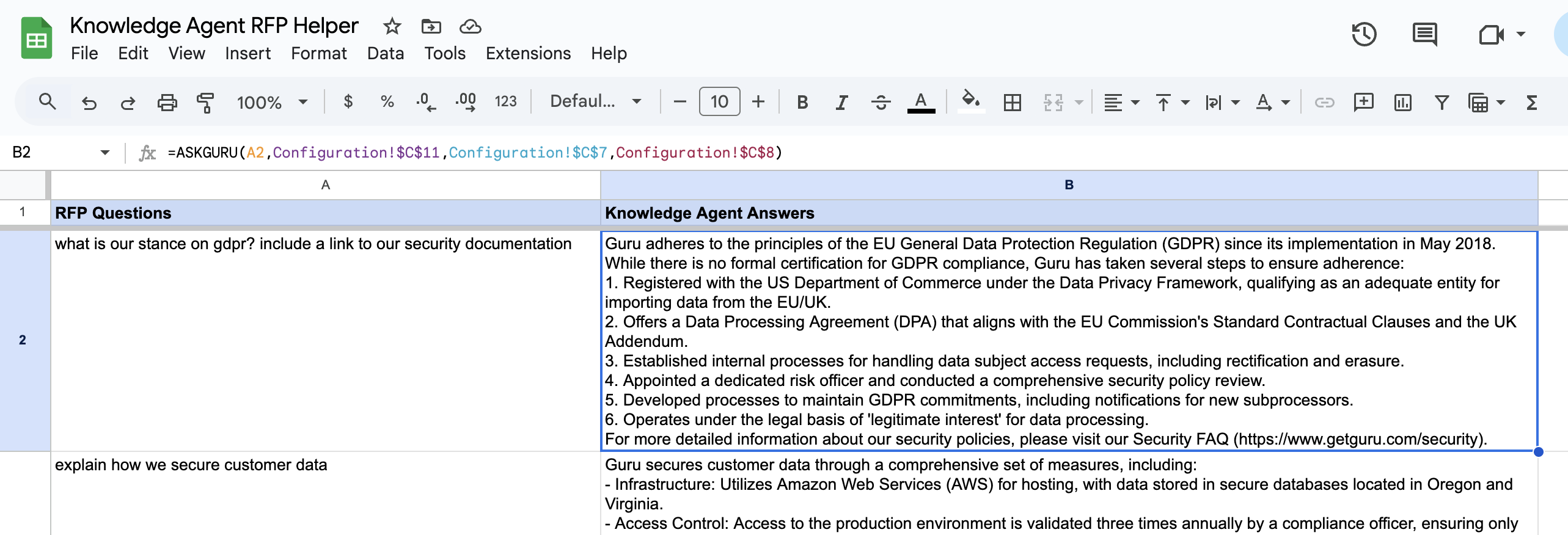
In the above example, the function is taking the question from cell A2, and the configuration settings (Knowledge Agent Id, User and Token) from a separate sheet.
Copy this sheet to use this yourself:
Updated 4 months ago