
Connecting Guru's MCP Server to OpenAI Agent Builder
Integrate Guru's MCP server with OpenAI Agent Builder to give your custom AI agents access to your organization's knowledge base
MCP Server URL: https://mcp.api.getguru.com/mcp
OpenAI Agent Builder
- Open your agent in Agent Builder and click the + next to Tools, then choose MCP Server. Alternatively, open your MCP node and click + Add
- Click + Server at the top right to add a new MCP server
- In your terminal, base64 encode your Guru email address and API token. Do not include the curly brackets. The output here will be used in step 4.
echo -n "{email}:{api_token}" | base64- Fill out the following fields:
- URL: https://mcp.api.getguru.com/mcp
- Label: guru_mcp_server
- Description: Guru MCP Server
- Authentication: Custom headers
- header: Authorization
- value: Basic
<output_from_step_3>
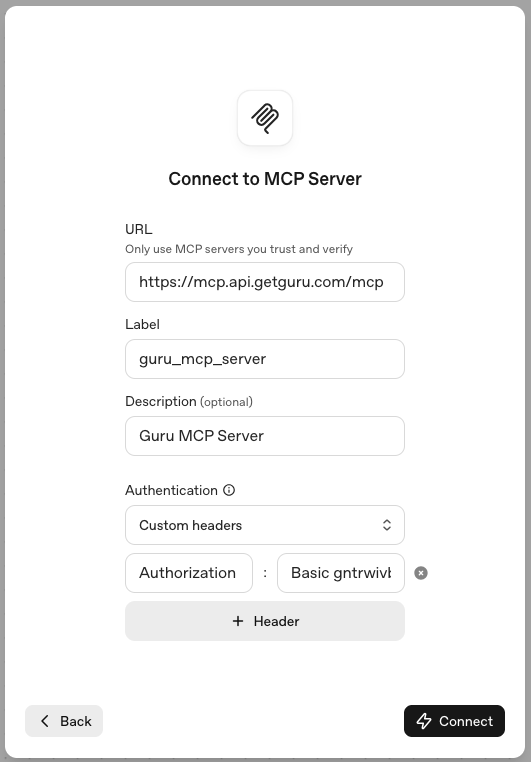
- Click Connect - this will establish the connection to Guru's MCP server
- Select the Guru tools you'd like your agent to have access to
- Click Add
Start using Guru in your workflow
Once you're connected, your AI tool can:
- Ask questions about your internal documentation
- Search for specific topics across your knowledge base
- Integrate Guru's AI capabilities into your development or writing workflows
Additional Resources
Updated 5 months ago
Did this page help you?